
🗓️ Last Updated: March 2026 | Verified from ignou.ac.in
Checking your IGNOU grade card online is something every student needs to do after every Term End Examination — but the process confuses a lot of people, especially first-timers.
Maybe you don’t know which website to go to. Maybe you found the portal but don’t understand what the statuses mean. Or maybe your grade card is showing some courses but not others.
Whatever the situation, this guide covers everything. By the end of this article, you’ll know exactly how to check your IGNOU grade card, what every status on it means, and what to do when something doesn’t look right.
Table of Contents
What Is the IGNOU Grade Card?
The IGNOU grade card is your official academic record. It shows your performance in every course you’ve registered for — including your assignment marks, your Term End Examination marks, and your overall grade for each course.
Think of it as your marksheet. It is generated and maintained by IGNOU’s Student Evaluation Division (SED) at the headquarters in New Delhi.
Your grade card is important for many things — applying for jobs, higher studies, getting your degree, and verifying your academic performance. So it’s worth knowing how to read it correctly.
When Is the IGNOU Grade Card Updated?
IGNOU updates grade cards after every Term End Examination cycle. There are two TEE cycles every year:
June TEE — Exam held in June. Results typically start appearing by late July or August.
December TEE — Exam held in December. Results typically start appearing by January or February.
However, not all courses are updated at the same time. IGNOU updates results in phases. Some courses appear earlier, some take longer — especially courses with practical components or projects.
If it’s been less than 45 days since your exam, just keep checking every few days. It’s completely normal for some courses to take longer.
How to Check IGNOU Grade Card Online — Step by Step
Here is the exact process to check your IGNOU grade card. Follow each step carefully.
Step 1: Open the official grade card portal. This is the official IGNOU grade card portal. Do not use any third-party websites — always go directly to the official URL.
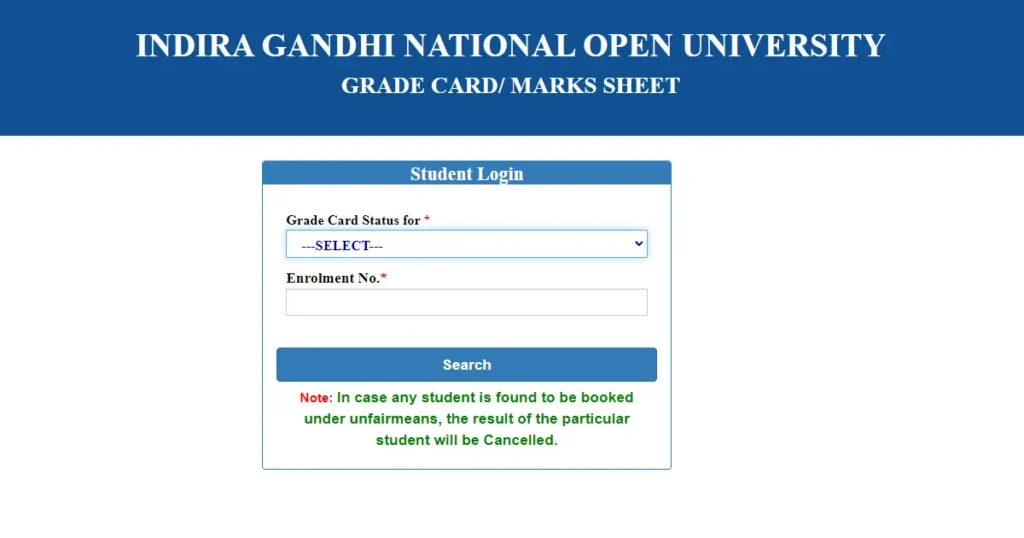
Step 2: Select your programme. Choose your programme code from the dropdown menu. For example, if you’re doing a Bachelor of Arts, select BA. If you’re doing MBA, select MBA. Make sure you pick the right one.
Step 3: Enter your enrollment number. Type your enrollment number in the box provided. Make sure you enter the correct number. If you’re an older student, note that IGNOU has migrated to 10-digit enrollment numbers on the Samarth portal. Use your current 10-digit number, not your old 9-digit one.
Step 4: Click Search. Click the Submit or Search button. The system will fetch your grade card details.
Step 5: Read your grade card. Your grade card will appear on the screen. It will show:
- Course codes you registered for
- Assignment marks (out of 100, contributing 30% to final grade)
- TEE marks (out of 100, contributing 70% to final grade)
- Overall grade for each course
- Status of each course
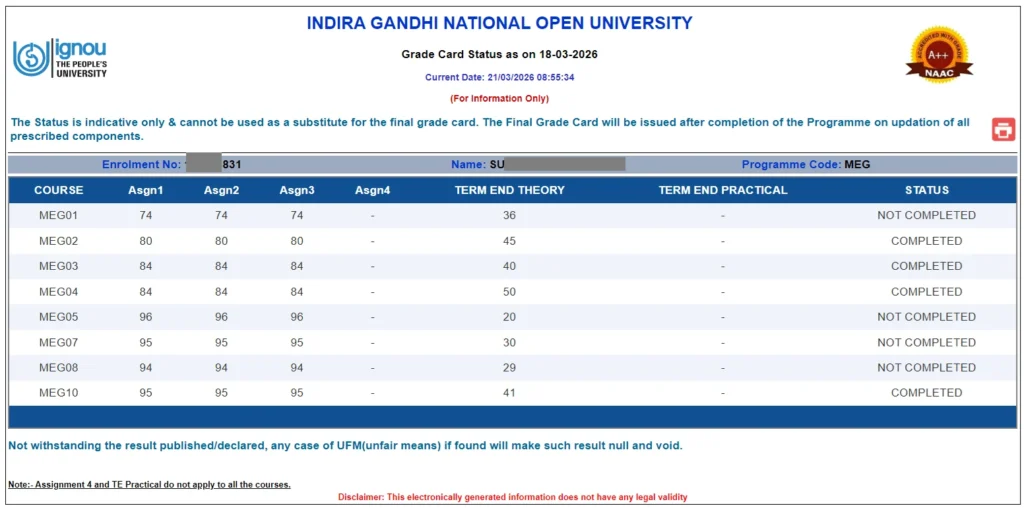
Step 6: Check on mobile if needed. The portal works on mobile browsers too. If you’re checking on a phone, use Chrome or Firefox for the best experience. If the page doesn’t load properly, switch to desktop view in your browser settings.
How to Download Your IGNOU Grade Card
Once your grade card loads on screen, here’s how to save it:
On a computer: Press Ctrl + P (or Cmd + P on Mac) to open the print dialog. Select “Save as PDF” instead of a printer. Choose your save location and click Save. This gives you a PDF copy of your grade card.
On a mobile phone: Tap the three dots (menu) in your browser. Select “Print” or “Share.” Choose “Save as PDF.” The grade card will be saved to your phone’s storage.
There is no separate “Download” button on the portal — saving as PDF is the standard way IGNOU students save their grade cards.
Keep a copy saved on your phone and email it to yourself as a backup. You’ll need it for job applications, college admissions, and other official purposes.
What Do the Statuses on the Grade Card Mean?
This is where most students get confused. Here’s a clear breakdown of every status you might see:
“Grade Shown” or Marks Visible
This is the normal status. Your result has been declared and your marks are showing. Check your grade and move on.
“Not Completed” (NC)
This means your result is incomplete. Either your assignment marks haven’t been updated, your TEE marks haven’t been entered, or both are missing. It does not mean you have failed — it means the data is not complete yet in the system.
If you see NC and it’s been more than 45 days since your exam, contact your Study Centre first to check if assignment marks were forwarded to SED.
“Withheld” (W)
Your marks exist but IGNOU is not releasing them. There is a specific reason — usually a missing assignment, unpaid exam fee, or a pending issue. This needs action from your side. Read our detailed article on IGNOU result withheld to know exactly how to handle this.
“Incomplete” (I)
Similar to Not Completed. Some data is missing from the system. Follow up with your Study Centre and SED.
“Result Awaited” (RA)
Your result hasn’t been declared yet. This is common for practical courses, project courses, or courses where evaluation takes longer. Keep checking.
Blank or Course Not Showing
If a course you registered for doesn’t appear at all, it could mean your exam form wasn’t submitted for that course, or there’s a data mismatch. Check your exam form submission first.
With the IGNOU Result Guide, you’ll find step-by-step help for checking results, fixing withheld or not completed status, revaluation, pass marks, and more.
What Does Each Grade Mean in IGNOU?
IGNOU uses a letter grade system instead of percentage marks. Here’s what each grade means:
A — Excellent → 80% and above
B — Very Good → 60% to 79.9%
C — Good → 50% to 59.9%
D — Satisfactory → 40% to 49.9%
E — Unsatisfactory → Below 40%
To pass a course in IGNOU, you need to get at least a C grade overall — which means 50% or above when your assignment marks and TEE marks are combined.
But here’s the important part — you need to pass both components independently. If you score well in assignments but below the minimum in the TEE, you won’t pass the course. And vice versa.
The minimum passing marks in the TEE is 35 out of 100 for Undergraduate Students and 40 for Postgraduate Students. For assignments, you need to score at least the minimum required by your programme. Check your specific programme’s prospectus for exact passing criteria.
What to Do If Your Grade Card Has a Problem
Here’s a quick action guide based on the problem:
If a course is showing “Not Completed”: Contact your Study Centre coordinator. Ask them to verify that your assignment marks were sent to SED. If not, they need to forward the correct award list to the Student Evaluation Division at IGNOU headquarters.
If a course is showing “Withheld”: There is a pending issue on your account. Read our article on IGNOU result withheld for the step-by-step fix. The most common reasons are a missing assignment or unpaid exam fee.
If a course is not showing at all: Check whether you filled the exam form for that course. If yes, wait for the standard 45-day period. If it’s been longer, email the correct SED section for your programme level.
If you think there’s a mistake in your marks: You can apply for revaluation. IGNOU allows students to request re-evaluation of their TEE answer scripts. The revaluation fee is paid at the time of applying. Results of revaluation can take 2–3 months.
If your grade card is showing wrong personal details: Contact your Regional Centre for name or enrollment number corrections. Do not ignore errors — they can cause problems when you apply for your degree or migration certificate later.
Who to Contact for Grade Card Issues
Here is the correct, verified contact information:
For Masters degree grade card issues
- Email: mdresult@ignou.ac.in
- Phone: 011-29572212
For Bachelors degree grade card issues
- Email: bdresult@ignou.ac.in
- Phone: 011-29572211
For Diploma and PG Diploma grade card issues
- Email: dpresult@ignou.ac.in
For Certificate programme grade card issues
- Email: cpresult@ignou.ac.in
For assignment marks not updated
- Email: assignment@ignou.ac.in
- Phone: 011-29571325
For general grade card grievances
- Email: sedgrievance@ignou.ac.in
- Phone: 011-29572218
iGRAM — Online Grievance Portal
- Website: igram.ignou.ac.in
When writing to any of these contacts, always include your enrollment number, programme code, course code, exam cycle (June/December and year), and a brief description of the problem. This helps them trace your records faster.
Wrapping Up
Checking your IGNOU grade card is simple once you know the right portal and the right steps. Go to gradecard.ignou.ac.in, enter your 10-digit enrollment number, select your programme, and your result will appear.
If something looks wrong — whether a course is showing “Not Completed,” “Withheld,” or is missing entirely — don’t panic. Each situation has a clear fix. Start with your Study Centre, then contact SED, and if needed, raise a complaint on iGRAM.
And if you need more help, check our articles on IGNOU result withheld and IGNOU result not showing for specific step-by-step solutions to those problems.
Frequently Asked Questions
Q1. Where can I check my IGNOU grade card online?
You can check your IGNOU grade card on the official portal at gradecard.ignou.ac.in. Enter your 10-digit enrollment number, select your programme code, and click Submit. Your grade card with all course-wise marks and grades will appear on screen. Always use the official IGNOU portal — avoid third-party websites for this.
Q2. What does “Not Completed” mean on the IGNOU grade card?
“Not Completed” on your IGNOU grade card means that the result data for that course is incomplete in the system. It could mean your assignment marks haven’t been updated, your TEE marks are missing, or both. It does not mean you have failed. Contact your Study Centre coordinator to check if your assignment marks were sent to the Student Evaluation Division at IGNOU headquarters.
Q3. What is the minimum passing grade in IGNOU?
In IGNOU, the minimum passing grade is C — which corresponds to 50% and above in terms of overall performance. You need to pass both the assignment component and the Term End Examination component independently. The minimum passing marks in the TEE is 35 out of 100 for Undergraduate Students and 40 for Postgraduate Students. Check your specific programme’s prospectus for exact details.
Q4. How do I download my IGNOU grade card?
There is no direct download button on the IGNOU grade card portal. Once your grade card loads on screen, press Ctrl + P on your computer and select “Save as PDF” to save it. On mobile, use the browser’s print option and choose “Save as PDF.” Keep a copy stored safely — you’ll need it for official purposes later.
Q5. My IGNOU grade card is showing “Withheld” — what should I do?
If your IGNOU grade card shows “Withheld” for a course, it means your marks exist but are being held back due to a pending issue. The most common reasons are a missing assignment submission, unpaid examination fee, or an unresolved administrative issue. Read our detailed article on IGNOU result withheld for the exact step-by-step process to get it resolved.
Have a question about your grade card? Ask in the comments and we’ll help you figure it out.