
🗓️ Last Updated: March 2026 | Verified from ignou.ac.in
Checking your IGNOU results sounds simple. Go to the website, enter your enrollment number, done.
But if you have ever stared at a grade card showing “Withheld” or “Not Completed” – or worse, found nothing at all – you know it is not always that simple.
This guide covers everything about IGNOU results in one place. Whether you are checking your result for the first time, dealing with a problem on your grade card, or trying to figure out whether to apply for revaluation – you will find the answer here.
Bookmark this page. It will come in handy every semester.
Table of Contents
How IGNOU Results Work
IGNOU evaluates students on two components for most courses.
Assignments – 30% weightage. These are the Tutor Marked Assignments you submit at your Study Centre. They are evaluated by an academic counsellor and the marks are sent to the Student Evaluation Division at IGNOU headquarters.
Term End Examination (TEE) – 70% weightage. This is the written exam held twice a year in June and December. Papers are sent to examiners centrally and marks are entered into the system by the Student Evaluation Division.
Both components are evaluated independently. You need to pass both separately – not just score well in the combined total. This is the most important thing to understand about how IGNOU results work.
Your final letter grade for each course is calculated from the weighted combination of both scores. Once both are in the system, your grade card is updated automatically.
This is also why result problems happen. If either component is missing – assignment marks not forwarded, exam form not filled, or a data entry error somewhere – your result gets stuck. Understanding this helps you identify the root cause quickly when something goes wrong.
When Are IGNOU Results Declared?
IGNOU holds Term End Examinations twice a year.
June TEE – Exam held in June. Results start appearing from late July and continue through August and September.
December TEE – Exam held in December. Results start appearing from late January and continue through February and March.
Results are not declared all at once. IGNOU updates them in phases, course by course. Some courses come out earlier, some take longer – especially those with practical components, projects, or larger enrolments.
The standard timeline to wait before raising a concern is 45 days from your exam date. If it has been less than 45 days, keep checking. If it has been longer, it is time to take action.
One important note – IGNOU does not send you any notification when your result is updated. You have to check the portal yourself. Make it a habit to check every few days during the result period.
How to Check Your IGNOU Result
Your IGNOU result is available on the official grade card portal. Here is how to check it.
Step 1 – Go to https://gradecard.ignou.ac.in/gradecard/ on your browser.
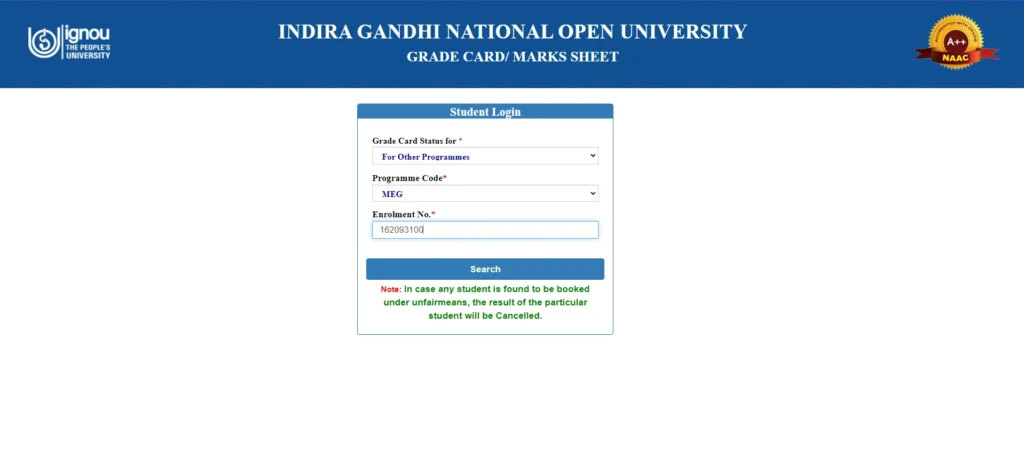
Step 2 – Enter your 10-digit enrollment number. If you are an older student with a 9-digit number, log in to the Samarth portal first to get your updated 10-digit number.
Step 3 – Select your programme code from the dropdown.
Step 4 – Click Search.
Step 5 – Your grade card will load showing all courses, marks, and grades.

Always use the official portal directly. Avoid third-party websites that claim to show IGNOU results – they are unreliable and often outdated.
For a detailed walkthrough with screenshots and tips for mobile users, read our complete guide on how to check your IGNOU grade card.
Understanding Your Grade Card
Your grade card has several columns. Here is what each one means.
Course Code – The code for the course you registered for.
Assignment Marks – Your marks in the Tutor Marked Assignment out of 100.
TEE Marks – Your marks in the Term End Examination out of 100.
Overall Grade – The letter grade is calculated from the weighted combination of both.
Status – This shows whether the result is complete, withheld, or not completed.
The grading system in IGNOU works like this:
| Grade | Meaning | Percentage |
|---|---|---|
| A | Excellent | 80% and above |
| B | Very Good | 60% to 79.9% |
| C | Good | 50% to 59.9% |
| D | Satisfactory | 40% to 49.9% |
| E | Unsatisfactory | Below 40% |
For most UG programmes, a D grade means you have passed. For PG programmes and MBA specifically, you need at least a C grade to pass a course.
For the full breakdown of pass marks, minimum scores per component, and how the final grade is calculated, read our detailed article on IGNOU pass marks and grading system.
IGNOU Result Status – What Each One Means
When you open your grade card, you may see different statuses. Here is a quick reference.
Grades showing (A/B/C/D/E) – Normal. Your result is declared.
Not Completed (NC) – One or both evaluation components are missing in the system. Usually means assignment marks were not forwarded by your Study Centre.
Withheld (W) – Your marks exist but IGNOU is holding them back. There is a specific pending issue – unpaid exam fee, missing assignment, or a UFM case.
Result Awaited (RA) – Result not declared yet. Common for practical courses and project courses.
Blank or course missing – The course is not appearing at all. Usually means exam form was not submitted.
Each status needs a different fix. The next sections cover the three most common problem statuses in detail.
Result Withheld – Reasons and Fix
A withheld result means your marks exist but IGNOU is not releasing them. There is an active hold placed by the university.
The most common reasons are:
- Assignment not submitted or not recorded at Study Centre
- Examination fee not paid
- Pending programme fee or dues
- UFM (Unfair Means) case
- Course registration mismatch
Quick fix steps:
- Identify the reason by checking with your Study Centre and the Samarth portal
- Resolve the pending issue – submit assignment, clear dues, or contact SED
- If unresolved, raise a complaint on iGRAM
- Keep checking your grade card every few days after taking action
For the complete step-by-step process with all reasons and fixes, read our full article on IGNOU result withheld.
Result Not Showing – Reasons and Fix
If a course is missing entirely from your grade card, the most likely reasons are:
- Result not declared yet for that course
- Exam form not filled for that course
- Assignment not submitted or not recorded
- Wrong enrollment number entered
- Checking the wrong exam cycle
Quick fix steps:
- Wait for 45 days from exam date before treating it as a problem
- Confirm your exam form was submitted and payment was successful
- Check your assignment submission status with your Study Centre
- If it has been over 45 days, email SED with your enrollment number, programme, course code, and exam cycle
For the complete breakdown of every possible reason and the right fix for each, read our full article on IGNOU result not showing.
Grade Card Not Completed – Reasons and Fix
Not Completed is the most common result problem in IGNOU. It means one or both evaluation components are missing.
The most common reason – and the one that resolves the majority of cases – is that your Study Centre evaluated your assignment but never forwarded the marks to the Student Evaluation Division at headquarters.
Quick fix steps:
- Visit your Study Centre with your assignment submission receipt
- Ask the coordinator whether your marks were sent to SED
- If not, request them to forward the award list immediately
- If confirmed and still showing NC after a few weeks, email SED
- Raise on iGRAM if no response in 2 to 3 weeks
For all possible reasons and the full step-by-step process, read our detailed article on IGNOU grade card Not Completed.
IGNOU Pass Marks and Grading System
Many students are confused about how many marks they actually need to pass. Here is a quick summary.
TEE minimum pass marks:
- UG programmes – 35 out of 100
- PG programmes – 40 out of 100
Assignment minimum pass marks:
- All programmes – 40 out of 100
Important rule – you must pass both components independently. Scoring well in one does not compensate for failing the other.
Overall passing grade:
- UG programmes – D grade or above (40% and above)
- PG programmes and MBA – C grade or above (50% and above)
For the complete explanation with examples of how your grade is calculated, read our full article on IGNOU pass marks and grading system.
IGNOU Revaluation – When and How to Apply
If your TEE marks feel lower than what you deserve, you can apply for revaluation. Here is what you need to know quickly.
Key facts:
- Revaluation is for TEE marks only – not assignments
- Fee is Rs. 750 per course
- Apply at https://onlineservices.ignou.ac.in/REEVALUATION/
- Upload your IGNOU ID card and apply within the official window
- Marks can go up or stay the same – they cannot go down
- Results take 2 to 4 months to reflect on grade card
- Apply for copy of answer script and revaluation together in one go if you want both
The revaluation window opens after results are declared and stays open for a limited period. Do not wait too long after your result comes out.
For the complete process with step-by-step application instructions, read our full article on IGNOU revaluation.
What to Do After Your Result
If you passed all courses:
Re-register for the next semester on the Samarth portal at https://ignouadmission.samarth.edu.in/ before the deadline. Missing re-registration means losing a full semester.
Save your grade card as a PDF from https://gradecard.ignou.ac.in/gradecard/ Keep copies safely for future use.
If this was your final semester and all courses are complete, check the IGNOU website for convocation registration details.
If you failed one or more courses:
Identify whether you failed the TEE, the assignment, or both. Then:
- Failed TEE only – appear in the next TEE cycle. Assignment marks usually carry forward.
- Failed assignment only – resubmit the assignment in the current session. TEE marks are retained.
- Failed both – resubmit assignment and appear in the next TEE cycle.
Do not let backlogs pile up. IGNOU gives you a maximum programme duration and failed courses need to be cleared within that time.
For the next steps after your specific result situation, your re-registration process is covered in detail in our IGNOU Admission Guide. If something went wrong in this result cycle because of an assignment issue, our IGNOU Assignment Guide has everything on submission, deadlines, and tracking.
Who to Contact for Result Problems
Here is the complete verified contact list for result-related issues:
Assignment marks not updated
- Email: assignment@ignou.ac.in
- Phone: 011-29571325
Masters degree results
- Email: mdresult@ignou.ac.in
- Phone: 011-29572212
Bachelors degree results
- Email: bdresult@ignou.ac.in
- Phone: 011-29572211
Diploma and PG Diploma results
- Email: dpresult@ignou.ac.in
Certificate programme results
- Email: cpresult@ignou.ac.in
Practical marks not updated
- Email: practicalsed@ignou.ac.in
Project result queries
- Email: projects@ignou.ac.in
- Phone: 011-29571324
General result grievances
- Email: sedgrievance@ignou.ac.in
- Phone: 011-29572218
iGRAM – Online Grievance Portal
- Website: igram.ignou.ac.in
Always include your enrollment number, programme code, course code, and exam cycle in every email. This one habit alone speeds up resolution significantly.
If you have tried SED and are not getting a response, raise a formal complaint on iGRAM. For a full guide on how to use iGRAM effectively, read our IGNOU Grievance Guide.
Frequently Asked Questions
When does IGNOU declare results?
IGNOU declares June TEE results starting from late July and December TEE results starting from late January. Results come out in phases – not all courses are updated at the same time. Wait for at least 45 days from your exam date before treating a missing result as a problem that needs action.
How do I check my IGNOU result?
Go to the official grade card portal at https://gradecard.ignou.ac.in/gradecard/ Enter your 10-digit enrollment number, select your programme code, and click Submit. Your grade card will show marks and grades for all courses. Always use the official portal directly.
What does “Withheld” mean on IGNOU grade card?
Withheld means your marks exist but IGNOU is not releasing them due to a specific pending issue – most commonly a missing assignment submission or unpaid examination fee. Read our full article on IGNOU result withheld for the step-by-step fix.
Can I apply for revaluation if I am not happy with my marks?
Yes. IGNOU allows revaluation of TEE answer scripts. The fee is Rs. 750 per course. Apply at https://onlineservices.ignou.ac.in/REEVALUATION/ within the official window after results are declared. Your marks can only go up or stay the same – they cannot go down during revaluation.
What should I do if my result is showing Not Completed?
Start by visiting your Study Centre with your assignment submission receipt and asking whether your marks were forwarded to the Student Evaluation Division. This resolves the majority of Not Completed cases. If confirmed and still not fixed, email SED and raise a complaint on iGRAM. Read our full article on IGNOU grade card Not Completed for the complete process.
Have a result problem not covered here? Drop it in the comments and we will point you to the right solution.