
🗓️ Last Updated: March 2026 | Verified from ignou.ac.in
You checked your IGNOU grade card and instead of marks, you see “Not Completed.” No grade. No percentage. Just those two words sitting there making you anxious.
First thing – do not panic. “Not Completed” is one of the most common statuses on the IGNOU grade card. It shows up for thousands of students every semester. And in most cases, it gets resolved without too much trouble.
But you do need to take action. It will not fix itself on its own. We have a complete IGNOU results guide to check result, fix withheld or not completed status, revaluation, pass marks and more.
This article explains exactly what IGNOU grade card not completed means, every possible reason it can happen, and the step-by-step process to get it resolved.
Table of Contents
What Does “Not Completed” Mean on IGNOU Grade Card?
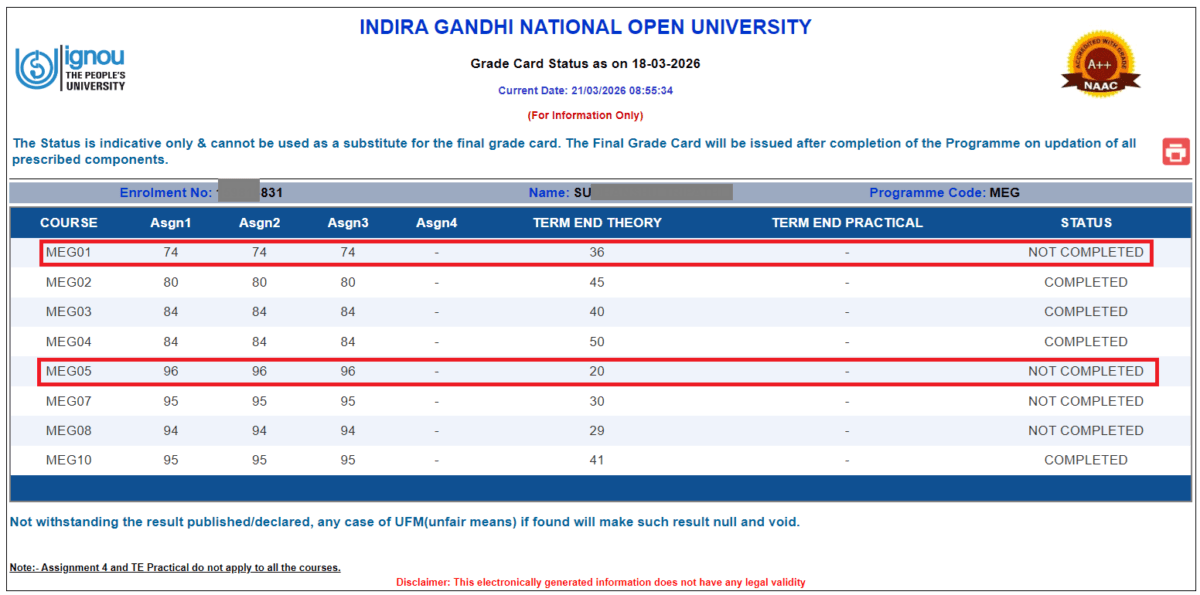
“Not Completed” on your IGNOU grade card means that the result data for that course is incomplete in the system. One or both of the evaluation components – assignment marks or TEE marks – are missing or not updated properly.
It does not mean you have failed the course. It does not mean your paper was lost. It simply means IGNOU’s system does not have complete data to generate a final result for you yet.
The status appears as “NC” or “Not Completed” in the status column next to your course code on the grade card portal.
Until the missing data is entered or updated, your result stays incomplete.
“Not Completed” vs “Withheld” vs “Result Not Showing” – What is the Difference?
These three situations feel similar but they are different. Many students confuse them. Here is a clear comparison:
Not Completed – Your course appears on the grade card but shows NC status. It means data is incomplete – usually assignment marks or TEE marks are missing. The course is there but the result cannot be generated yet.
Withheld – Your course appears on the grade card and the status says “Withheld.” This means your marks exist but IGNOU is deliberately holding them back due to a specific pending issue – like an unpaid exam fee, a missing assignment, or a UFM case. There is an active hold placed by the university.
Result Not Showing – The course does not appear on your grade card at all. Either your exam form was not submitted for that course, or there is a data mismatch in the system.
Each situation needs different steps to fix. If your issue is withheld or result not showing, check our separate articles on IGNOU result withheld and IGNOU result not showing for the right guidance.
This article focuses specifically on the Not Completed status.
Reasons Why Your Grade Card Shows Not Completed
1. Assignment Marks Not Forwarded by Study Centre
This is the single most common reason for a Not Completed status.
You submitted your assignment at the Study Centre. The coordinator evaluated it. But the marks were never forwarded to the Student Evaluation Division at IGNOU headquarters. So the system has no assignment marks for you.
This happens because of delays in data entry at the Study Centre level, or sometimes because the award list was sent late or lost in the process.
What to do: Visit your Study Centre with your assignment submission receipt and ask the coordinator to check whether your marks were sent to SED. If not, they need to forward the correct award list immediately.
2. Assignment Marks Updated But TEE Marks Not Entered Yet
Sometimes your assignment marks are there but the TEE result has not been declared yet for your course. This is common for courses that take longer to evaluate – especially courses with large enrollment or those where evaluation happens in phases.
What to do: Wait for the standard 45-day period after your exam. If it has been longer than that, contact SED.
3. TEE Marks Updated But Assignment Marks Are Missing
The reverse situation – your exam result is out but assignment marks were never entered. This can happen if the Study Centre never submitted the award list.
What to do: Same as reason 1. Contact your Study Centre coordinator with your submission receipt.
4. You Appeared in Exam But Did Not Submit Assignment
If you appeared in the TEE without submitting the assignment, IGNOU will not generate a complete result for that course. You need to submit the assignment first. After submission and evaluation, your result can be generated for the next TEE cycle.
What to do: Submit the assignment for the current cycle. Appear in the TEE in the next exam cycle for that course.
5. Data Entry Error at Study Centre or SED
Sometimes marks were submitted correctly but a data entry mistake – a wrong enrollment number, a wrong course code, or an incorrect mark entry – caused the data to not match in the system.
What to do: Visit your Study Centre and ask them to verify the exact marks submitted and the enrollment number used. If there is an error, the coordinator needs to send a corrected award list to SED.
6. Practical Marks Not Updated
For courses that have a practical component, practical marks are evaluated and entered separately. Even if theory and assignment marks are there, missing practical marks can cause a Not Completed status.
What to do: Email practicalsed@ignou.ac.in with your enrollment number, programme code, course code, and exam cycle details.
7. Result Genuinely Not Declared Yet
Sometimes it is simply a matter of timing. IGNOU declares results in phases and some courses take longer. If you checked very soon after the exam period ended, the result may just not be out yet.
What to do: Wait for at least 45 days from the date of your exam before treating it as a problem that needs action.
8. You did not pass either in Term End Theory or Assignment
There are two parts to your evaluation in most courses: Assignments (30% weightage) and Term End Examination or TEE (70% weightage). Both components are evaluated separately. If you did not obtain passing marks either in the assignment or the Term End Theory (Written) Exam or Practicals, the IGNOU result will show incomplete.
What to do: Submit the assignments again or reappear in the exam, whichever is your case.
How to Fix IGNOU Grade Card Not Completed – Step by Step
Follow this sequence carefully. Do not skip steps.
Step 1 – Confirm it has been more than 45 days since your exam
If it has not been 45 days yet, wait. IGNOU results come in phases and some courses take longer. Checking too early and panicking is a common mistake.
Step 2 – Check your assignment submission status
Go to your Study Centre and ask the coordinator one simple question – were my assignment marks sent to SED for this course and exam cycle? Carry your assignment acknowledgement receipt as proof of submission.
If the marks were not sent, the coordinator needs to forward them. This single step resolves the Not Completed status for the majority of students.
Step 3 – Check your TEE exam form submission
Log in to the student portal and confirm that your exam form was submitted and payment was successful for that particular course. If the exam form was not submitted, unfortunately you need to appear in the next TEE cycle.
Step 4 – Contact SED directly
If both assignment marks and exam form are confirmed but the status is still Not Completed after 45 days, write to the Student Evaluation Division with the following details:
- Your enrollment number
- Programme code
- Course code showing Not Completed
- Exam cycle (June or December and year)
- Brief explanation of the issue
Use the correct email for your programme level:
- Masters programmes – mdresult@ignou.ac.in
- Bachelors programmes – bdresult@ignou.ac.in
- Diploma and PG Diploma – dpresult@ignou.ac.in
- Certificate programmes – cpresult@ignou.ac.in
Step 5 – Raise a complaint on iGRAM
If you do not get a response from SED within 2 to 3 weeks, raise a formal grievance on the iGRAM portal at igram.ignou.ac.in. Note your complaint number and follow up every 10 to 15 days if needed.
Step 6 – Keep checking your grade card
IGNOU does not send you a notification when your status is updated. Keep checking your grade card at https://gradecard.ignou.ac.in/gradecard/ every few days after you have taken action.
How Long Does It Take to Get Fixed?
This depends entirely on the reason. If it is:-
- A Study Centre data issue, the coordinator forwards the marks to SED and SED updates the system – it can take anywhere from 2 to 6 weeks after the coordinator sends the data.
- A TEE marking delay, some courses simply take longer to evaluate and the result comes out in phases – it can resolve on its own within 4 to 8 weeks of the exam date.
- A data entry error that needs investigation and correction at multiple levels, it can take 2 to 3 months.
The key point is, the sooner you identify the reason and take the right action, the faster it gets resolved. Waiting and hoping is not a strategy here.
Who to Contact at IGNOU for Not Completed Status
Here is the verified contact information:
For assignment marks not updated
- Email: assignment@ignou.ac.in
- Phone: 011-29571325
For Masters degree result issues
- Email: mdresult@ignou.ac.in
- Phone: 011-29572212
For Bachelors degree result issues
- Email: bdresult@ignou.ac.in
- Phone: 011-29572211
For Diploma and PG Diploma result issues
- Email: dpresult@ignou.ac.in
For Certificate programme result issues
- Email: cpresult@ignou.ac.in
For practical marks not updated
- Email: practicalsed@ignou.ac.in
For general grievances
- Email: sedgrievance@ignou.ac.in
- Phone: 011-29572218
iGRAM – Online Grievance Portal
- Website: igram.ignou.ac.in
Tip: Always include your enrollment number, programme code, course code, and exam cycle in every email you send. Without these, IGNOU cannot trace your records quickly.
Wrapping Up
Seeing “Not Completed” on your IGNOU grade card is frustrating but it is fixable. In most cases, the reason is simple – your assignment marks were not forwarded by your Study Centre to SED.
Start there. Visit your Study Centre, carry your assignment receipt, and ask whether your marks were sent to headquarters. That single conversation resolves the issue for most students.
If that does not work, follow the step-by-step process in this article – check your exam form, contact SED by email, and raise on iGRAM if needed.
And remember – keep checking your grade card at https://gradecard.ignou.ac.in/gradecard/ regularly. IGNOU updates results silently without any notification to you.
If your status is showing “Withheld” instead of “Not Completed,” that is a different situation with a different fix. Head over to our article on IGNOU result withheld for the exact steps.
Frequently Asked Questions
Q1. What does “Not Completed” mean on IGNOU grade card?
“Not Completed” on your IGNOU grade card means the result data for that course is incomplete in the system. It usually means either your assignment marks or your TEE marks – or both – have not been entered or updated properly. It does not mean you have failed. It means there is missing data that needs to be corrected before a final result can be generated for you.
Q2. Why is my IGNOU result showing Not Completed even after I submitted my assignment?
The most common reason is that your Study Centre submitted your assignment to their records but never forwarded your marks to the Student Evaluation Division at IGNOU headquarters. Visit your Study Centre with your assignment submission receipt and ask the coordinator to verify whether the award list was sent to SED. If not, request them to forward it immediately.
Q3. How long does it take for IGNOU to fix a Not Completed status?
It depends on the reason. If the Study Centre forwards the missing marks, it can be updated in 2 to 6 weeks. If it is a TEE evaluation delay, it can take 4 to 8 weeks from the exam date. More complex cases involving data entry errors can take 2 to 3 months. Taking action quickly – contacting your Study Centre and SED promptly – speeds up the process significantly.
Q4. What is the difference between Not Completed and Withheld on IGNOU grade card?
Not Completed means the result data is incomplete – one or both evaluation components are missing in the system. Withheld means your marks exist but IGNOU is deliberately holding them back due to a specific pending issue like an unpaid fee or a missing assignment. Both appear on the grade card but need different steps to fix. Read our article on IGNOU result withheld for the specific process to handle a withheld status.
Q5. Who should I contact if my IGNOU grade card shows Not Completed?
Start with your Study Centre coordinator – ask them to confirm whether your assignment marks were forwarded to SED. If that is confirmed and the issue persists after 45 days, email SED at the address for your programme level – mdresult@ignou.ac.in for Masters, bdresult@ignou.ac.in for Bachelors, dpresult@ignou.ac.in for Diploma or PG Diploma, and cpresult@ignou.ac.in for Certificate programmes. If there is no response in 2 to 3 weeks, raise a complaint on the iGRAM portal.
Still seeing Not Completed after following these steps? Drop your situation in the comments and we will help you figure out the next move.